14 September 2026
Avoid Costly Rework: Procurement Checklist for PWA vs Native App
Use a procurement first checklist to choose PWA or native apps. Define essential features, estimate budget, and get up to five vetted quotes.
Avoid Costly Rework: Procurement Checklist for PWA vs Native App
Choose a progressive web app when you need speed, reach, and lower cost. Choose native when your product depends on deep hardware access, background processing, or App Store visibility. Most business apps fall into the first bucket. Cross-platform frameworks and hybrid builds exist as a middle path when you need store presence without paying for two separate codebases.
TL;DR:
- PWAs are ideal for content and commerce apps that prioritize search discoverability, instant updates, and lower development costs across devices.
- iOS limitations restrict PWAs from reliable background processing and hardware features like NFC, requiring native solutions for such functionalities.
- Cross-platform frameworks like React Native and Flutter provide a middle ground, offering near-native performance with shared codebases for store presence, but still face store review delays.
- Native apps are necessary when deep hardware access, background tasks, or store visibility are non-negotiable, despite higher costs and slower release cycles.
- Most projects should begin with a web-first or hybrid approach by assessing hardware needs, distribution channels, and budget constraints before committing to a specific technology.
Table of Contents
- PWA vs Native App: The Quick Comparison
- What Can a PWA Actually Do in 2026?
- PWA or Native App: Weighing the Business Trade-offs
- What Do PWA and Native Really Cost to Build and Run?
- How Do You Decide Between PWA and Native for Your Project?
- What Are Your Real Implementation Options?
- How 5quotes Helps You Choose and Hire the Right Team
- A Pragmatic Take on the PWA vs Native Debate
- Get Vetted Quotes Before You Commit to Either Architecture
- Where This Information Comes From
- Sources
- FAQ
PWA vs Native App: The Quick Comparison
Before you brief a developer, get the trade-offs straight. Here’s how PWA and native stack up on the factors that actually move budgets and timelines:
- Distribution: PWAs live at a URL and get found through search and links; native apps require a listing in the Apple App Store or Google Play, plus approval.
- Install friction: A PWA installs with one tap from a browser prompt (Android) or a manual “Add to Home Screen” step (iOS); native requires a store download and permission grants.
- Hardware access: Native apps get full access to sensors, Bluetooth, cameras, and OS-level APIs; PWAs get a growing but incomplete subset.
- Offline and background work: Both support offline modes, but native handles background tasks and large local storage more reliably.
- Update cadence: PWAs update instantly on refresh; native apps wait on store review, sometimes for days.
- Typical cost and timeline: PWAs generally cost less and ship faster since there’s one codebase; native means separate iOS and Android builds, which multiplies both.
The iOS and Android gap matters more than most founders expect. Android’s Chrome browser supports install prompts, push notifications, and background sync out of the box. iOS’s Safari lags behind, limiting some push notification behavior and requiring manual install steps that plenty of users never discover.
What Can a PWA Actually Do in 2026?
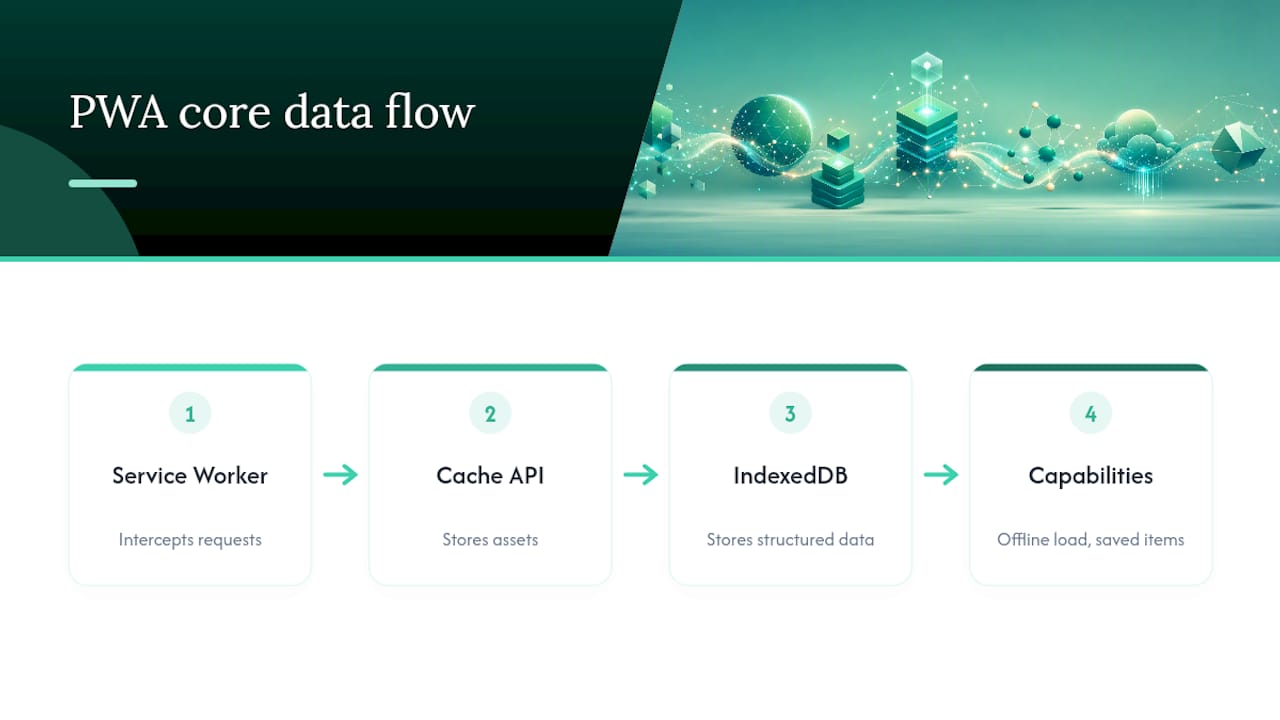
A production PWA runs on three core technologies: service workers, the Cache API, and IndexedDB. Service workers intercept network requests and serve cached content when there’s no connection. The Cache API stores assets like images and scripts locally. IndexedDB handles larger structured data, like a shopping cart or a list of saved items. Together, these let a PWA load instantly, work offline, and push updates without waiting on anyone’s approval.
Here’s where the ceiling shows up. Native-only territory still includes persistent background processing, NFC payments on iOS, HealthKit integration, Live Activities on the lock screen, and dependable background Bluetooth Low Energy connections. A PWA can request some hardware access through browser APIs like Web Serial or WebHID, but support is inconsistent across browsers and effectively absent on Safari for many of these.
Pro Tip: If your app’s core value depends on a single hardware feature, like a barcode scanner or NFC tap, test that exact API on the exact browsers your users run before committing to a PWA. A gap here kills the project after launch, not before.
The platform split runs deep: Android’s Chrome ships broad Web API support, while iOS’s WebKit engine restricts background execution and several device APIs by design, not oversight. That’s an Apple platform policy, and it won’t change because your app needs it to.
PWA or Native App: Weighing the Business Trade-offs
The technical differences translate directly into business risk. Here’s how each approach plays out where it counts.
- PWA advantages: one codebase serving every device, full SEO visibility since pages are crawlable, instant updates with no review wait, and meaningfully lower build cost. The iOS install-friction problem is real, but you can mitigate it with a clear onboarding prompt that walks users through “Add to Home Screen.” If Play Store presence still matters, a Trusted Web Activity wraps your PWA into a listable Android app with minimal extra work.
- Native advantages: full device API access, consistent push notifications and background behavior on both platforms, and the trust signal of a real store listing with reviews and ratings. The downside is cost and maintenance: two codebases, two release pipelines, and two sets of store review delays every time you ship a fix.
A booking platform, content site, or ecommerce storefront usually favors PWA since discovery and speed matter more than deep OS integration. A fitness app syncing with wearables, a field-service tool needing offline GPS and camera access, or a payments app using NFC usually needs native.
What Do PWA and Native Really Cost to Build and Run?
Budget conversations get clearer once you separate build cost from ongoing maintenance cost, because the gap between PWA and native widens over time, not just at launch.
- PWA: lower upfront cost since there’s one codebase and one deployment target. Cross-platform frameworks like React Native or Flutter sit in the middle, higher than a PWA but well below building separate native apps for iOS and Android.
- Native (per platform): highest upfront cost, and that cost repeats for each platform since Swift/Kotlin codebases don’t share logic.
- Maintenance asymmetry: a PWA ships a fix the moment you deploy. A native app waits on Apple’s and Google’s review queues, which can take anywhere from hours to several days depending on the change and the platform’s current review load.
- Iteration speed: if your business runs on frequent experimentation (pricing tests, new features, quick bug fixes), store review cycles slow you down every single time, and that friction compounds across a product roadmap.
Cross-platform frameworks reduce the maintenance gap somewhat but don’t eliminate store review delays, since you’re still submitting compiled native builds.
How Do You Decide Between PWA and Native for Your Project?
Run your project through this checklist before you write a single line of a developer brief. Answer each question honestly, not optimistically.
- Does your app need background execution beyond notifications (continuous location tracking, ongoing Bluetooth connections, background audio)? If yes, lean native.
- Does your product depend on App Store or Play Store discovery for new customer acquisition, rather than search or social links? If yes, you need a store presence, whether native or a wrapped PWA.
- Do you need hardware features like NFC payments, HealthKit, or reliable camera-plus-sensor fusion? If yes, native is close to mandatory today.
- Is search visibility, shareable links, or fast iteration central to your growth plan? If yes, PWA wins on distribution alone.
- Is your budget tight and your timeline short? A PWA gets you to market with one build instead of two or three.
- Do most of your users run Android, or a mix where iOS install friction is tolerable? If your audience is Android-heavy, PWA limitations shrink significantly.
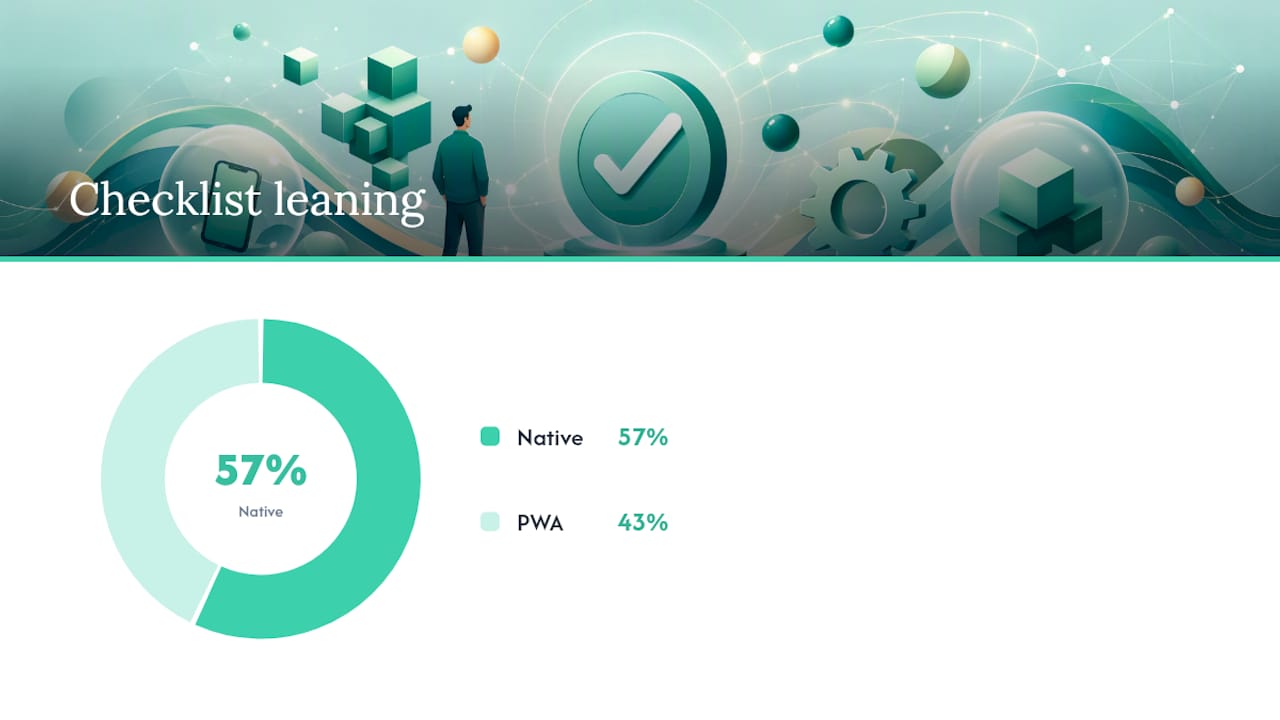
Score it simply: three or more “native” answers means you should budget for native or cross-platform from the start. Mostly PWA answers mean you can launch web-first and add native wrappers later if a specific gap emerges.
Red flag: if your business model depends on push notification reliability on iOS, or on background processing that survives the user closing the browser tab, stop considering a pure PWA. That’s a native requirement, full stop.
What Are Your Real Implementation Options?
A production-grade PWA isn’t a website with a manifest file bolted on. It requires performance budgets (page interactive in under a few seconds), a deliberate caching strategy through service workers, feature detection so the app degrades gracefully on browsers missing certain APIs, and a designed onboarding flow that teaches iOS users to install the app manually. Skip any of these and the “PWA” ends up feeling like a slow website, which undermines the whole pitch.
Cross-platform frameworks solve a different problem: you want native store presence and closer-to-native performance without paying for two full native teams. React Native and Flutter both compile to native binaries and give you access to most device APIs, at a cost between a PWA and fully separate native builds. Cross-platform development makes the most sense when you need store listings but can’t justify duplicate native teams.
A hybrid-first tactic works well for a lot of businesses: ship the PWA core to own your acquisition funnel and iterate fast, then wrap it in a thin native shell, or add one native module, only for the specific OS feature you can’t get any other way.
How 5quotes Helps You Choose and Hire the Right Team
Deciding on paper is one thing. Finding a developer who can build it well is another problem entirely. 5quotes connects you with vetted New Zealand developers across PWA, native, and cross-platform work, and you get up to five tailored quotes instead of chasing agencies one by one.
Attach your decision checklist to the brief you post. Specify which hardware features are non-negotiable, whether store presence matters, and your rough timeline. The developers who contact you have been vetted to reduce cold outreach from unproven vendors. Post your project once, compare up to five real quotes side by side, and pick the developer whose approach matches the architecture you’ve already decided on.
A Pragmatic Take on the PWA vs Native Debate
Most founders pick a technology before they’ve defined their requirements, then spend six months rationalizing the choice. Start from distribution and your non-negotiable features instead. If your growth depends on search, links, or fast iteration, a web-first or hybrid-first build is the lower-risk path, with native reserved for the specific hardware or background feature you genuinely can’t get any other way. Test that assumption with real quotes before you commit a budget to either path.
— 5Quotes
Get Vetted Quotes Before You Commit to Either Architecture
5quotes is the alternative to guessing your way through a technology decision: instead of picking PWA or native based on which framework a developer happens to prefer, you post your project once and get up to five tailored quotes from vetted New Zealand developers who bid on your actual requirements.
If your checklist points to a web-first build, the progressive web app development page connects you with developers who specialize in service worker architecture and offline performance. If your requirements lean native or cross-platform, the mobile app development category covers both paths, and every developer who reaches out has already cleared 5quotes’s vetting process, so you’re comparing real capability, not marketing copy. Post your brief today and see what your project actually costs to build right.
Where This Information Comes From
Claims here draw on Shopify’s PWA vs native guide for capability comparisons, GeeksforGeeks for platform distinctions, MDN’s Web Serial documentation for hardware API limits, and Statista’s ecommerce outlook for market context.
Sources
FAQ
Why Is PWA Not More Popular Yet?
Adoption lags mainly because of iOS friction. Apple limits push notifications and background features in Safari, and installation requires a manual “Add to Home Screen” step that many users never find.
Is Netflix a PWA?
Netflix runs a PWA version of its service in browsers, but its primary mobile experience is native apps on iOS and Android, which handle offline downloads and device integration more reliably.
Is PWA Still Relevant in 2026?
Yes. PWAs remain a strong choice for content, commerce, and booking products where search visibility, install-free access, and fast updates matter more than deep hardware integration.
Will PWA Replace Native Apps?
Unlikely in full. PWAs keep closing the capability gap, but native apps still hold the advantage for background processing, complex hardware access, and store-driven discovery, so both approaches will likely coexist.
Should I Choose PWA or Native for a New Business App?
Start with your distribution channel and hardware needs. If growth depends on search and fast iteration, build a PWA first; if your product needs deep OS integration or store presence from day one, budget for native or cross-platform.
Recommended
Read next
Getting this built?
Tell us what you need and compare up to 5 quotes from developers who do this work.
Get quotes